PythonHQ
PythonHQ @PythonHQ ·
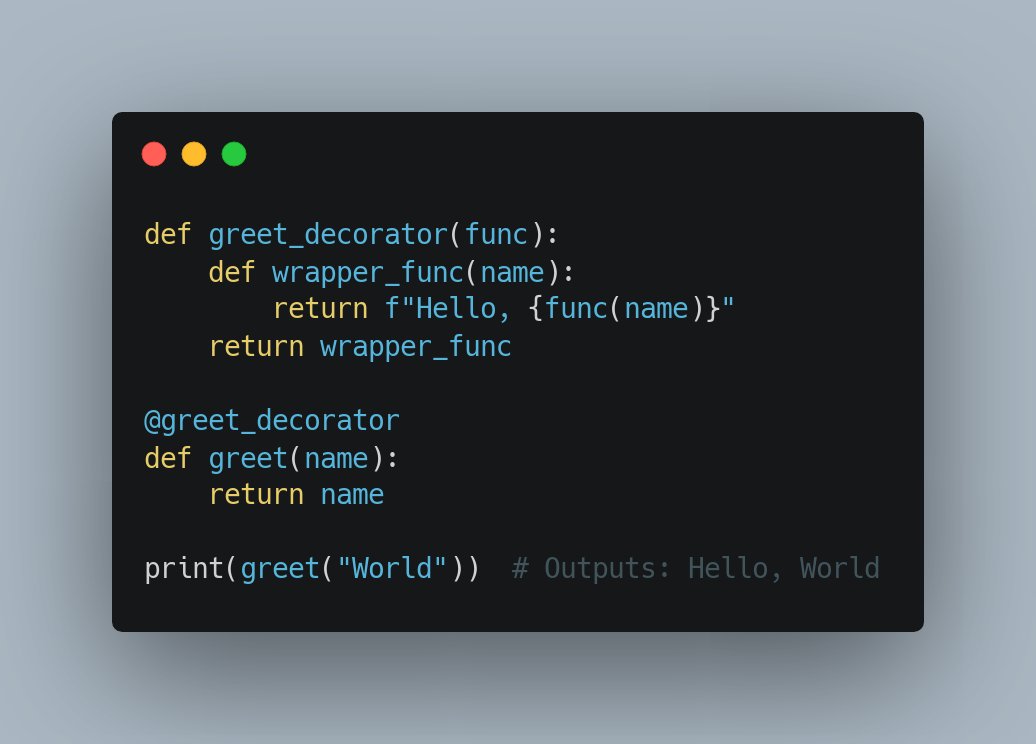
Tweet: Dealing with repetitive statements? Use Python #decorators to enhance functions without modifying them. This is key to DRY (Don't Repeat Yourself) principle. #PythonTip
6

PythonHQ
PythonHQ @PythonHQ ·
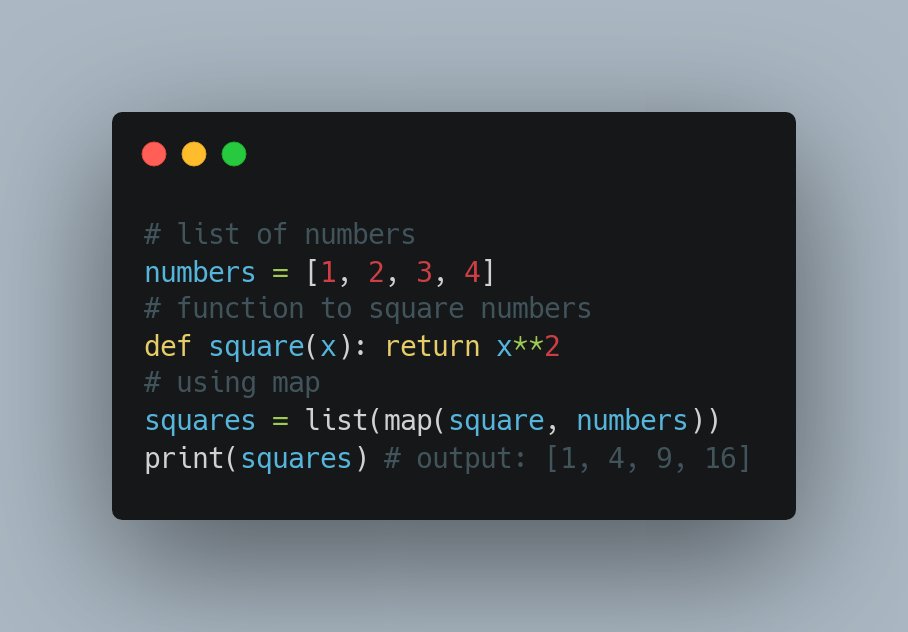
#1. Tweet Ever wondered how to use the built-in Map function in Python? This handy function applies a given function to every item in an iterable. It's super useful when you need to process all items in a list or any iterable 🕺 #PythonTipb
8
PythonHQ
PythonHQ @PythonHQ ·
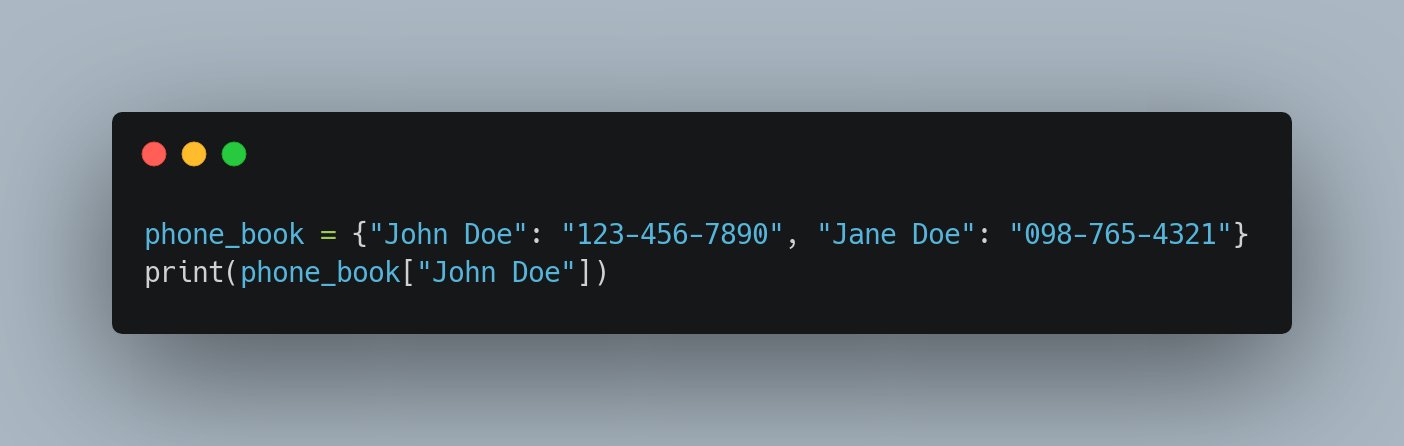
Tweet: #PythonTip 🐍💡Ever wondered how to store and access data in an organized manner? Dictionaries can be your asset! Ideal for many real-world applications like a contact book where you can store and retrieve phone numbers5n
6
PythonHQ
PythonHQ @PythonHQ ·
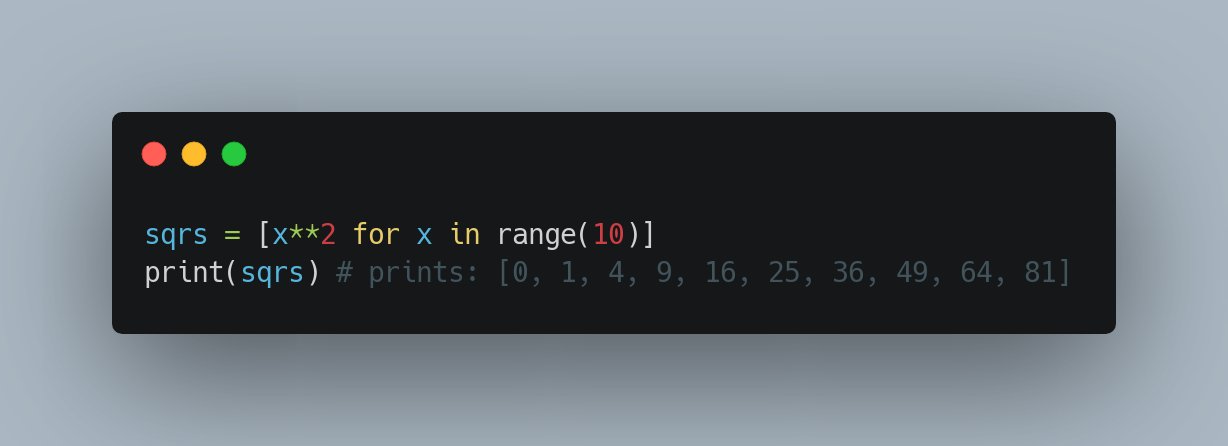
Ever lost in nested loops? Here’s a solution - Python's List Comprehensions. They provide a concise way to create lists based on existing lists. Faster, more readable, and efficient! #PythonTip
7
coin_collector
coin_collector @RookieProg777 ·
【locとilocの違い再確認|🍙】 💡 お昼の学びタイム locはラベル、ilocは整数位置。混同防止に、最初にラベル/indexの種類をチェックしましょう! 記事はこちらpythondatalab.com/pandas-loc-ilo…BDW #Pandas #PythonTip #DataScience
Pandas locとilocの違い|行・列の抽出/スライス/条件指定を図解で解説【第8回】

loc(ラベル指定)とiloc(位置指定)の違いを図解で整理。行・列の抽出、スライス、条件指定、よくあるエラー例まで、実例を使って分かりやすく解説します。

From pythondatalab.com
97
coin_collector
coin_collector @RookieProg777 ·
【info()とdescribe()でデータ要約|🍙】 💡 お昼の学びタイム 再掲:describe(include='all')で文字列含む全カラム要約。数値だけでなくカテゴリも確認しましょう! 記事はこちらpythondatalab.com/pandas-info-de…2Vu #Pandas #PythonTip #DataScience
Pandas info()とdescribe()の違い|欠損値・型・統計量の見方を例で解説【第5回】

pandasのinfo()とdescribe()の違いを初心者向けに解説。データ型、欠損値、統計量、describe(include='all')の読み方まで整理。前処理前の確認精度を高められます。

From pythondatalab.com
45
coin_collector
coin_collector @RookieProg777 ·
【read_csvでデータ読み込み|🍙】 💡 お昼の学びタイム read_csvは、sepやencoding、dtype指定で読み込み精度を向上。ヘッダーやインデックス列の指定に注意しましょう! 記事はこちらpythondatalab.com/pandas-read-cs…pfE #Pandas #PythonTip #DataScience
Google Colab CSV 読み込み&保存入門|pandas で read_csv と to_csv を徹底解説【第 2 回】

Google Colab CSV を読み書きする方法を初心者向けに徹底解説。pandas の read_csv と to_csv を使い、Google Drive と連携してファイルを簡単に扱えます。エラー対処法も紹介。

From pythondatalab.com

36
Shital Shah
Shital Shah @sytelus ·
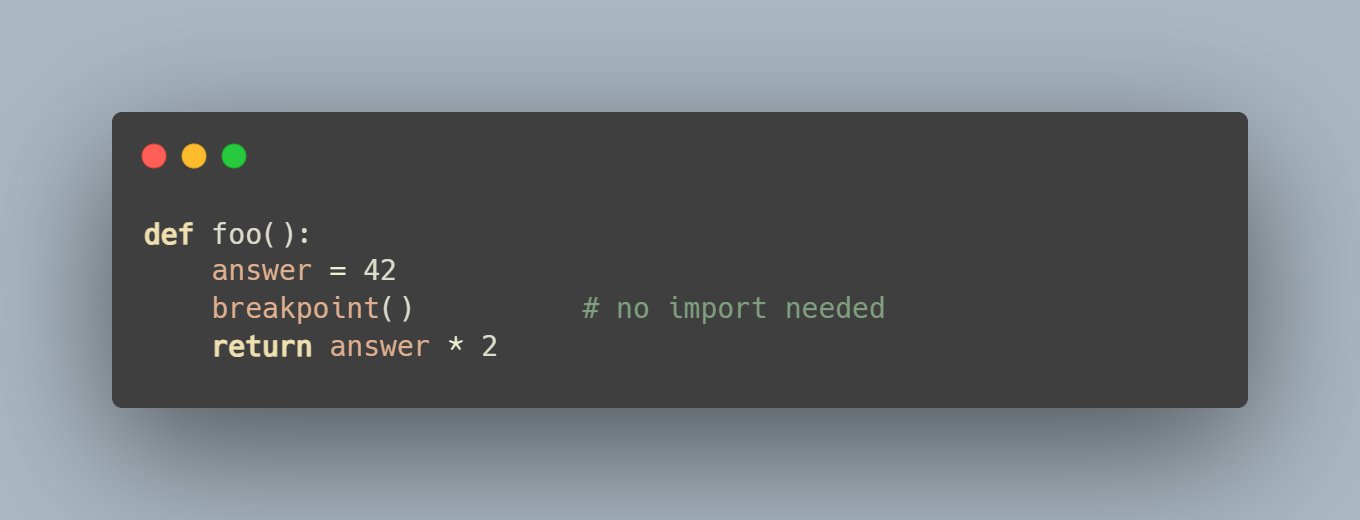
🚨 #PythonTip: 99% of devs are still sprinkling print() like confetti 🎉, meanwhile Python ships with a built-in function breakpoint() that you can drop anywhere with no imports needed. Type c to continue, n to step, or poke around in the REPLEA
1
1.2K
coin_collector
coin_collector @RookieProg777 ·
【dropで行・列削除|🍙】 💡 お昼の学びタイム dropは、axis=0で行、axis=1で列を削除。inplace=Trueを使うと元DFが直接更新されるので注意しましょう! 記事はこちらpythondatalab.com/pandas-drop/jiN #Pandas #PythonTip #DataScience
Pandas dropna()・drop_duplicates()の使い方|欠損/重複の削除とdrop()基本【第15回】

Pandasのdrop()/dropna()/drop_duplicates()をまとめて解説。欠損値・重複データの削除から、inplaceやerrorsオプションまで、出力例つきで整理します。

From pythondatalab.com
27
coin_collector
coin_collector @RookieProg777 ·
【mergeでデータ結合(marge)|🍙】 💡 お昼の学びタイム mergeは SQL の JOIN 相当。on引数や how='inner'/'left' の違い、キーの重複に注意して使いましょう! 記事はこちらpythondatalab.com/pandas-marge/R0j #Pandas #PythonTip #DataScience
pandas mergeの使い方|DataFrame結合(inner, left, outer)の違いと実例【第12回】

pandasのmerge関数をわかりやすく解説。inner/left/outer結合の違い、複数キー結合、suffixesでの重複列対策まで実例付きで紹介。

From pythondatalab.com
169
coin_collector
coin_collector @RookieProg777 ·
【条件指定でデータ抽出(filtering)|🍙】 💡 お昼の学びタイム filteringは、Boolean 配列で DataFrame を絞り込む手法。複数条件の結合時は&や|の優先順位に注意しましょう! 記事はこちらpythondatalab.com/pandas-filteri…lxr #Pandas #PythonTip #DataScience
pandas 条件抽出(filtering)入門|AND/OR・query関数・複数条件の指定方法【第9回】

pandasの条件抽出(filtering)を基礎から解説。AND/ORの書き方やquery関数の使い方、複数条件指定の実例を出力付きで紹介。

From pythondatalab.com
31
coin_collector
coin_collector @RookieProg777 ·
locでデータ抽出|🍙】 💡 お昼の学びタイム locは、行ラベルと列ラベルを指定して抽出するメソッド。スライス指定では両端が含まれる点に注意しましょう! 記事はこちらpythondatalab.com/pandas-loc/tmK #Pandas #PythonTip #DataScience
【第6回【初心者向け】Pandasのlocで行や列をラベルで抽出する基本操作をやさしく解説【図解あり】

Pandasのlocを使って行や列をラベル名で抽出する方法を初心者向けに解説します。基本構文からエラー回避のコツ、出力結果の図解や体験談を交えて丁寧に紹介。特定列・行の選択、複数列の抽出、範囲指定、df.columnsやdf.indexの活用法まで実例付きでわかりやすくまとめました。

From pythondatalab.com

41
Fun with Python 🐍
Fun with Python 🐍 @YourPythonFun ·
Replying to @YourPythonFun
🗂️ Need multiple replacements? Use lists! 🎯 Loop through a list of tuples and iterate `.replace()` for each pair. This method is scalable, keeping your code efficient for multiple substitutions. 🌀 #PythonTip
1
8
PythonHQ
PythonHQ @PythonHQ ·
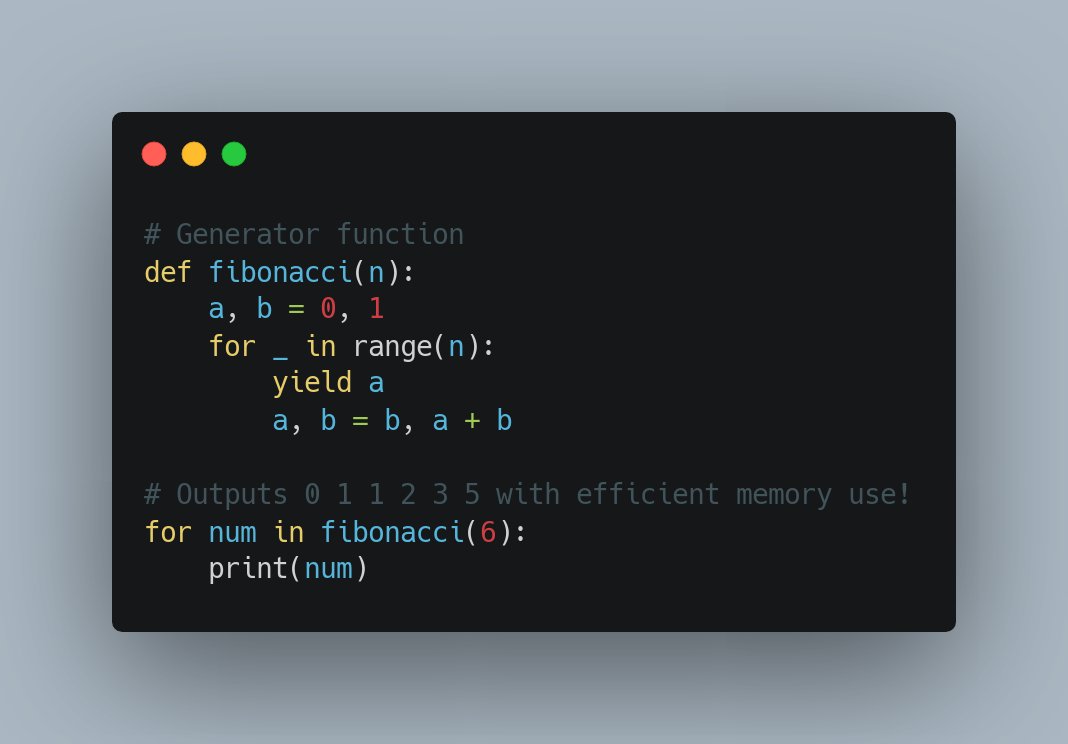
Tweet: #PythonTip 🐍 Did you know #Python Generators are memory efficient, perfect for large data? Generate items one at a time instead of storing everything in a list! Check this out:a
13
PrakashJain 🇮🇳
PrakashJain 🇮🇳 @code_n_learn ·
#PythonTip 📖 Read files using a context manager: ``` with open('filename', 'r') as file: file.readR() # Read entire file file.readline() # Read single line ``` #powerfulmadesimple #CodeNewbies #100DaysOfCode #pythonlearning
PrakashJain 🇮🇳 PrakashJain 🇮🇳 @code_n_learn ·
#PythonTip 🚀Python magic in action! 🐍This list comprehension [(x,y) for x in [1,2,3] for y in [2,4,5]] creates pairs like [(1,2), (1,4), ...] by combining every x with every y. Clean & powerful! 💡Try it out! #Python #Coding #newbies #pythonTip
16