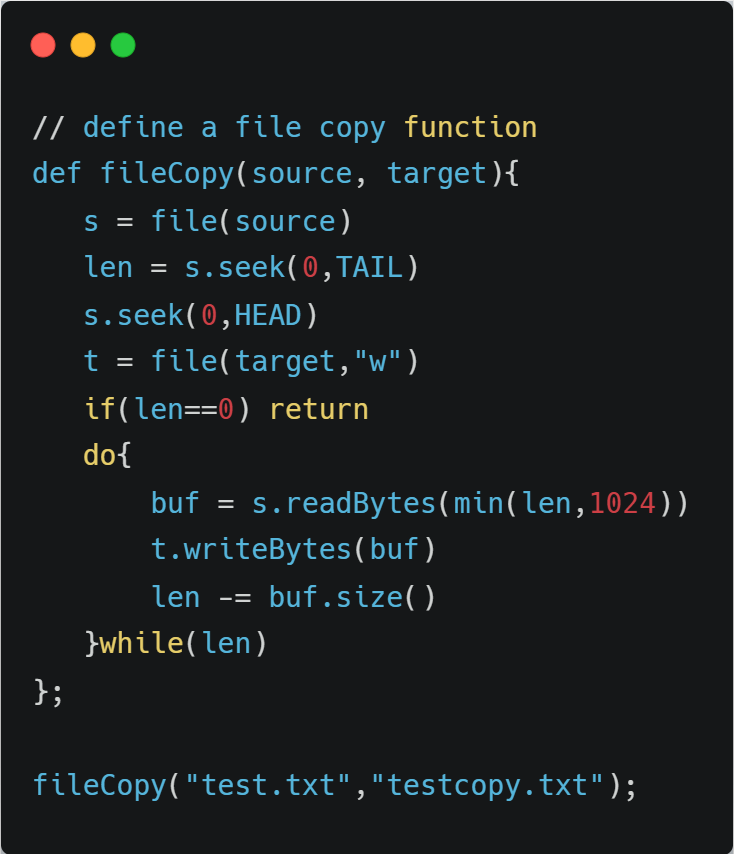
readBytes(fileHandle, sizeInByte) — read an exact number of bytes from a file handle (throws IOException on error)! 📂
Low‑level building block for custom binary file I/O and streaming.
#DolphinDB#FileIO
writeBytes(handle, bytes) — write full char buffer to file; returns bytes written or throws IOException. ✍️
Low‑level building block for custom binary I/O, streaming, and file utilities.
#DolphinDB#FileIO
Day 52 of coding🐍
Today I focused on strengthening File I/O & Lambda:
•Writing & reading files 📝
•Converting strings to int and list
•Filtering with lambda
•Understanding code flow step by step
Small steps every day build strong logic
#python#CodingJourney#Fileio#lambda
You can validate file uploads using multiple checks, including looking at flie signatures. These are usually the first bytes of a file. An overview of file signatures for well known file types are shown on Wikipedia :
en.wikipedia.org/wiki/List_of_f…#csharp#dotnet#fileio#security
So, we conclude that we should always close the file. To avoid this kind of issue and not have to deal with `close()` manually, it’s better to use the ideal approach, which is to work with files using `with open()`.
#FileIO#CodeNewbie#LearnPython
I keep hearing you must call `close()` after working with file I/O, but honestly, I don’t get why.
What actually happens if you don’t?
Anyone wanna break down what closing a file really means in simple terms?
#FileIO#PythoNewbie
My first #Python file bug was this:
I copied the file path from File Explorer and threw it into my Python code.
Was stuck on errors for like 15 minutes ‘cause Windows uses \ but Python’s not cool with it.
Finally, I manually switched the slashes to / and it worked. 🙃
#FileIO
My first #Python file bug was this:
I copied the file path from File Explorer and threw it into my Python code.
Was stuck on errors for like 15 minutes ‘cause Windows uses \ but Python’s not cool with it.
Finally, I manually switched the slashes to / and it worked. 🙃
#FileIO
Working with file I/O in #Python is awesome! Read/write files with open() and with, handle errors with try-except. Simple, fast, powerful! 💻 #FileIO , #Coding
Day who-knows-what of coding with #Python! 🤷🏽♂️
I'm practicing #FileIO, slowly getting to an intermediate level, but I still keep forgetting list and string methods (like pop(), join(), strip(), etc). #PythonProgramming#CodingJourney